
Written by the USInsurance247 Content Team | Reviewed by Rohit Negi, Insurance Expert, USInsurance247.com | Last updated: September 2026
Quick Answer
To log in to your COUNTRY Financial account, go to countryfinancial.com and click Log In (or visit my.countryfinancial.com directly), enter your registered email and password, and complete the one-time verification code if prompted. For employer 401(k) or 403(b) plans, use the separate portal at COUNTRYBusinessRetirement.com . For login help, call 866-COUNTRY (866-268-6879), Mon–Fri, 8 a.m.–7 p.m. CT.
At a Glance: Where to Go for What
| Need | Go Here |
| Insurance login (auto, home, life) | my.countryfinancial.com |
| Pay bills | Customer portal or mobile app |
| File / track claims | Customer portal or mobile app |
| Reset password | “Forgot Password” on the login page |
| 401(k) / 403(b) login | COUNTRYBusinessRetirement.com |
| Crop insurance | COUNTRYcrop.com |
| Mobile app | COUNTRY Financial Mobile — iOS & Android |
| Phone help | 866-COUNTRY (866-268-6879) |
Which portal should you use?
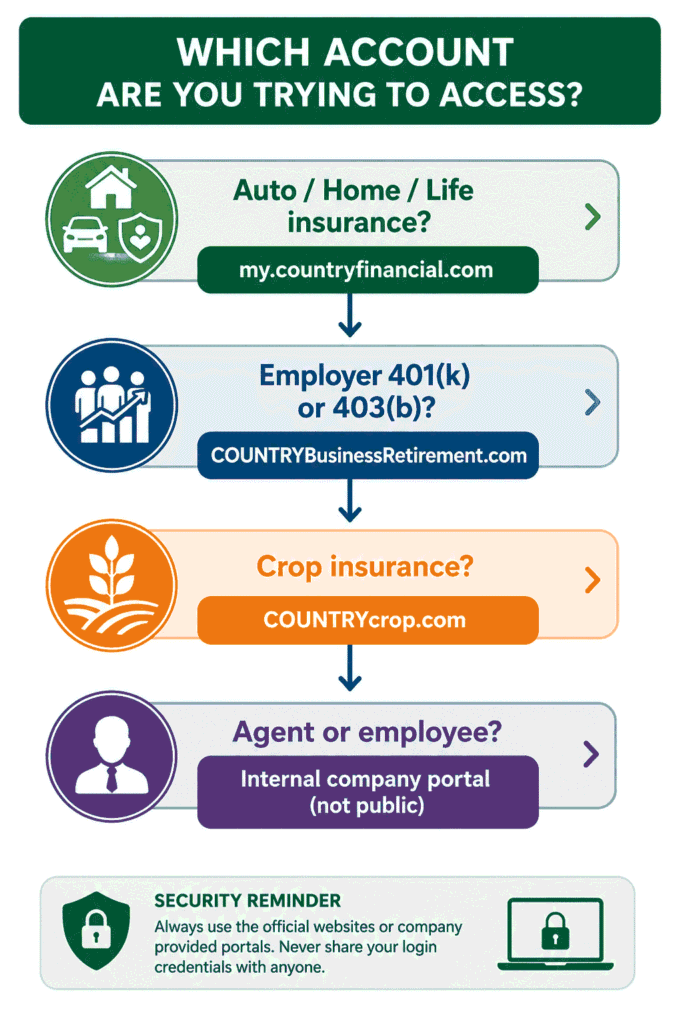
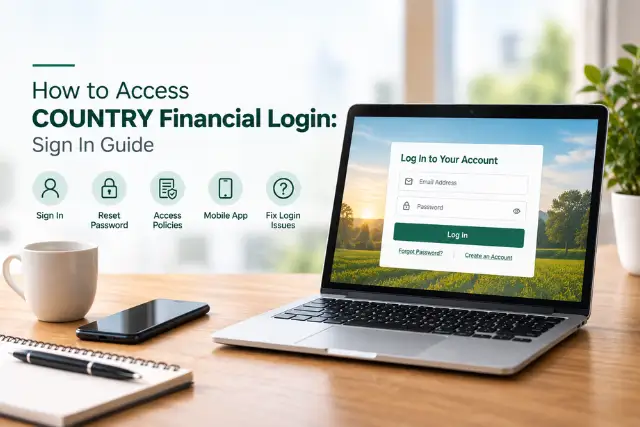
If you’ve ever typed “country financial login” into Google and landed on three different pages — one for insurance, one for retirement, one that wanted a completely different password — you’re not imagining things. COUNTRY Financial runs separate portals for different products, and knowing which door is yours saves a surprising amount of frustration.
This guide maps every COUNTRY Financial login portal, walks through registration and password resets, and covers the fixes for the login problems people actually hit. Bookmark it once; skip the guesswork forever. If you need to find policy information without logging in, our guide on how to read an insurance card can also help you identify important policy details. Bookmark this guide once and skip the guesswork.
Every COUNTRY Financial Login Portal in One Table
| What You’re Trying to Access | Where to Log In |
| Auto, home, life insurance & billing | my.countryfinancial.com (or countryfinancial.com → Log In) |
| 401(k) / 403(b) employer retirement plans | COUNTRYBusinessRetirement.com · help: 855-805-2971 |
| Personal investments via COUNTRY Trust Bank® | my.countryfinancial.com (rep can confirm product access) |
| Crop insurance | COUNTRYcrop.com or the COUNTRY® Crop Mobile app |
| Mobile access (all personal policies) | COUNTRY Financial Mobile app (iOS & Android) |
| Agent / employee logins (incl. email/OWA) | Internal company portals — not publicly accessible; staff use company-provided links |
One helpful simplification: there’s no separate “auto insurance login” or “life insurance login.” Every personal policy — car, home, life — lives behind the same my.countryfinancial.com door. The genuinely separate portals are employer retirement and crop.
Good to Know: You don’t need separate logins for auto, home, and life insurance. A single COUNTRY Financial account gives access to all eligible personal insurance policies — one email, one password, everything in one dashboard.
The three portals compared
| Portal | Who Uses It | Credentials | Main Features |
| Customer portal (my.countryfinancial.com ) | Policyholders | Registered email + password | Billing, claims, ID cards, rep messaging |
| Business retirement portal | 401(k)/403(b) participants | Separate account | Retirement balances, contributions, statements |
| Crop portal (COUNTRYcrop.com ) | Crop insurance customers | Separate account | Crop policies & documents |
What You’ll Need Before Logging In
- Your registered email address (this is your username)
- Your password
- Access to your verification device — the phone or email inbox where codes arrive
- A stable internet connection and an up-to-date browser
How to Log In to Your COUNTRY Financial Account (Step by Step)
1. Go to the official site – Type countryfinancial.com into your browser and click Log In — or head straight to my.countryfinancial.com. Typing the address yourself beats clicking links in emails, every time (more on that in the security section).
2. Enter your registered email and password – Your username is the email address you registered with — not a policy number.
3. Complete the verification code if prompted – COUNTRY sends a one-time security code by text, automated voice call, or email. Codes can take up to 10 minutes depending on your carrier, so give it a moment before hitting resend.
4. You’re in – The redesigned dashboard shows billing at a glance, policies, claims, and quick actions — pay a bill, pull up auto ID cards, report a claim, or message your rep.
What you can do after logging in
- Pay bills, set up recurring payments, and view payment history
- Download auto ID cards — look for the Auto ID icon on your home page and save the PDF to your phone
- Report auto or property claims and track claim status
- Update contact details, passwords, and verification phone numbers (up to four)
- Contact your representative directly
You can also review automobile insurance symbols to better understand the coverage information shown on your policy documents.
COUNTRY Financial Retirement & 401(k) Login
This is where most login confusion starts, so let’s make it plain: employer-sponsored retirement plans — 401(k) and 403(b) — do not appear in the main insurance portal. They live on a dedicated site:
Common Mistake: Trying to access an employer retirement account through the insurance portal. Your 401(k) credentials will never work at my.countryfinancial.com — employer-sponsored plans use a completely separate login below.
- Portal: COUNTRYBusinessRetirement.com
- Phone help: 855-805-2971
COUNTRY transitioned business retirement accounts to this enhanced website, so if your old bookmark stopped working or your credentials suddenly “don’t exist,” that migration is almost certainly why. Call the number above and they’ll walk you through re-establishing access.
Personal retirement and investment products managed through COUNTRY Trust Bank® generally appear under your regular my.countryfinancial.com account — but here’s a wrinkle worth knowing: third-party securities products, like certain annuities and mutual funds, won’t show up online at all. Those assets are held by outside firms, and your COUNTRY financial representative can point you to the right product sponsor for statements and access.
How to Register for Online Account Access
- Visit my.countryfinancial.com and choose the option to create an account.
- Have a policy number or account details handy, plus the email and phone number you want registered.
- Verify your identity with the one-time code sent to your phone or email.
- Set a strong password — and you’re done.
Assisted registration: if you’ve spoken with Client Support and they gave you a 10-digit registration code, there’s a dedicated path on the login page to create your account with that code — handy when standard registration hits a snag.
Forgot Your Password? Here’s the Reset Flow
- Click Forgot Password on the login page.
- Enter the email address associated with your account.
- Choose where to receive your verification code — email, text, or voice message (if your phone is registered).
- Enter the code, set a new password, and log in.
Worth Knowing: Changing your email in the Login & security section changes your actual login username. If you only want to update where COUNTRY contacts you, edit the Contact Information section instead — mixing these two up is a classic way people lock themselves out after switching email providers.
The COUNTRY Financial Mobile App Login
Searching for a “COUNTRY Financial login app”? The COUNTRY Financial Mobile app (App Store and Google Play) uses the same email and password as the website, and adds fingerprint or face login for faster access. From the app you can view ID cards, pay bills, manage recurring payments, report and track claims, and request 24/7 roadside assistance — genuinely useful at the roadside when you’d rather not dig for paperwork.
The self-service portal was recently redesigned, so the app and desktop dashboards now share the same layout — learn it once, use it everywhere.
Login Problems? Troubleshooting That Actually Works
| Problem | Fix |
| Verification code never arrives | Wait up to 10 minutes, then use Resend; try a different delivery method (email vs. text vs. voice call) |
| “Account already registered” loop | You likely registered before — use Forgot Password with your original email instead of re-registering |
| Fingerprint/face login stopped working in the app | Log in once with your password, re-enable biometrics in settings; reinstalling the app after an update often resets this |
| 401(k) credentials rejected | You’re probably on the wrong portal — employer plans use COUNTRYBusinessRetirement.com, not the insurance login |
| Login page won’t load or behaves oddly | Update your browser, clear cache and cookies, and make sure cookies and JavaScript are enabled — the portal requires both |
| Ad blocker or privacy extension interference | Temporarily disable extensions or try a private/incognito window; strict blockers can break the verification step |
| VPN blocking access | Disconnect the VPN and retry — some corporate and overseas VPN endpoints get flagged by security filters |
| Password manager autofilling old credentials | Clear the saved entry and type your current password manually, then update the manager after a successful login |
| Site down for everyone | Occasional scheduled maintenance happens — wait a short while, or use the mobile app / 866-COUNTRY for anything urgent |
| Locked out completely | Call 866-COUNTRY (866-268-6879), Mon–Fri 8 a.m.–7 p.m. CT — option 4 for account help; ask about assisted registration |
Before you contact support, have these ready
- Your registered email address
- A policy number, if available
- Your mobile phone for identity verification
- Recent billing information (amount or date of last payment helps)
- Government-issued ID details, in case identity verification is required
Walking in prepared usually turns a 20-minute call into a 5-minute one.
Keep Your Login Safe: 5 Quick Rules
- Type the URL yourself — countryfinancial.com — rather than clicking “login” links in emails or texts. Phishing pages that imitate insurer logins are a real and growing scam category.
- Check for the padlock and the exact domain before entering credentials.
- Use a unique password — not one shared with your email or banking.
- Keep your verification phone numbers current — you can register up to four, which saves you if one number changes.
- Log out on shared devices, and prefer the official app on your own phone.
Safety tip – official vs. unofficial pages: only enter your credentials on COUNTRY Financial’s official websites (countryfinancial.com, my.countryfinancial.com, COUNTRYBusinessRetirement.com, COUNTRYcrop.com) or the official mobile app. If a login page asks for unusual information — your SSN to “log in,” a payment to “unlock” your account — or simply looks different from previous visits, close it and verify the address before signing in. COUNTRY will never ask for your password by email, text, or unsolicited phone call.
Key Takeaways
- One login for all personal insurance — my.countryfinancial.com covers auto, home, and life together.
- 401(k) lives elsewhere — COUNTRYBusinessRetirement.com, help at 855-805-2971.
- Verification codes take up to 10 minutes — patience beats the resend button spam.
- Third-party annuities and funds won’t show online — ask your rep for the product sponsor.
- Type the URL, never click email links — and remember COUNTRY never asks for your password.
- COUNTRY Financial Login in 30 Seconds
- Use my.countryfinancial.com for all personal insurance — auto, home, and life share one login.
- Use COUNTRYBusinessRetirement.com for employer 401(k) and 403(b) plans (help: 855-805-2971).
- Reset your password with the Forgot Password option — codes arrive by email, text, or voice call.
- Use the mobile app for bill pay, claims, ID cards, and roadside assistance.
- Locked out or can’t verify? Call 866-COUNTRY, Mon–Fri 8 a.m.–7 p.m. CT.
Thinking about whether COUNTRY Financial is the right insurer for you in the first place? See how it stacks up in our best life insurance companies ranking, or compare account features across insurers in our AAA Life Insurance review and AAA vs. State Farm comparison.
Final Thoughts
COUNTRY Financial uses different online portals depending on the type of account you need to access. Personal insurance customers can use the main online account for eligible auto, home, life, and other policies, while employer-sponsored retirement plans and crop insurance use separate platforms.
If you cannot log in, start by confirming that you are using the correct portal and registered email address. For password or verification-code problems, use the available recovery options before contacting customer support.
Always access your account through COUNTRY Financial’s official website or mobile app, and avoid entering your credentials on unfamiliar login pages.
Frequently Asked Questions
How do I log in to my COUNTRY Financial account?
Visit countryfinancial.com and click Log In, or go directly to my.countryfinancial.com. Enter your registered email and password, complete the one-time verification code if asked, and you’ll land on your dashboard with billing, policies, ID cards, and claims.
Where is the COUNTRY Financial 401(k) login?
Employer retirement plans use a separate portal: COUNTRYBusinessRetirement.com, with phone support at 855-805-2971. Your 401(k) won’t appear in the main insurance account — that’s by design, not an error.
How do I reset my COUNTRY Financial password?
Use Forgot Password on the login page, enter your registered email, and choose email, text, or voice call for your verification code. Enter the code and set a new password. Codes can take up to 10 minutes — resend if needed.
Is there a COUNTRY Financial mobile app?
Yes — COUNTRY Financial Mobile on iOS and Android uses your website credentials plus optional fingerprint or face login. It covers ID cards, bill pay, claims, payment history, and 24/7 roadside assistance requests.
Why can’t I see my annuity or mutual fund after logging in?
Third-party securities products are held by outside firms and don’t display in COUNTRY’s online account. Your financial representative can give you the product sponsor’s contact details for statements and separate login access.
Is there a separate login for auto, home, or life insurance?
No — all personal insurance policies share one login at my.countryfinancial.com. Only employer retirement plans and crop insurance have their own portals.
What about COUNTRY Financial agent or employee email logins?
Agent, employee, and corporate email (OWA) logins are internal systems, not public portals. If you’re a COUNTRY employee or representative, use the access links provided by the company — customer-facing sites like this guide can’t (and shouldn’t) link to them.
What’s the customer service number for login help?
866-COUNTRY (866-268-6879), Monday–Friday, 8 a.m.–7 p.m. Central. Option 1 is claims, 3 is billing, and 4 covers everything else including account access. Support can also issue a 10-digit code for assisted registration.
Editorial Disclaimer: USInsurance247 is an independent publisher and is not affiliated with, endorsed by, or sponsored by COUNTRY Financial®. COUNTRY Financial® and related marks are trademarks of their respective owners; references here are for identification and reader guidance only. Portal URLs, phone numbers, and processes were verified against COUNTRY Financial’s official public pages as of July 2026 and may change — always confirmed on countryfinancial.com. Never share your login credentials with anyone, including websites like ours; we will never ask for them.